
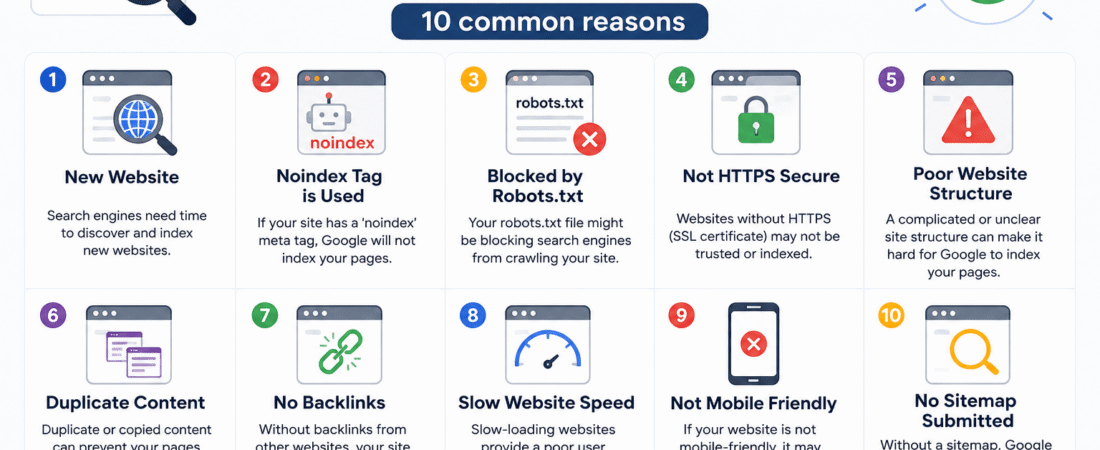
10 Common Reasons
Having a website that does not appear on Google is one of the most frustrating experiences any website owner can face. You have invested time, money, and energy into building your online presence, yet when you search for your business, your products, or even your exact domain name, nothing shows up. No listing, no snippet, no trace of your website anywhere in Google’s search results.
You are not alone. This is an incredibly common problem, and the good news is that in most cases it is entirely fixable. The key is understanding why it is happening in the first place. Google’s process of finding, evaluating, and displaying websites is more complex than most people realize, and there are numerous points in that process where things can go wrong.
In this guide, we will walk through the 10 most common reasons why your website is not showing on Google, explain exactly what causes each problem, and tell you what you can do to fix it. Whether you run a blog, an e-commerce store, a service business, or any other type of website, these insights apply to you.
1. Your Website Is Too New
This is the single most common reason websites do not appear in Google search results, and it is also the most misunderstood. Many people launch a new website and immediately expect to see it ranking on Google within hours or days. Unfortunately, that is simply not how Google works.
Google uses automated programs called crawlers or spiders to discover and index websites across the internet. These crawlers continuously roam the web, following links from one page to another and adding new pages to Google’s index — the massive database from which search results are drawn. For a brand new website, this process takes time.
Depending on your website’s authority, how many other sites link to it, and how frequently Google’s crawlers visit your domain, it can take anywhere from a few days to several weeks — and sometimes even a few months — for a new website to appear in Google search results. This is completely normal and does not indicate any problem with your site.
What to do: Submit your website to Google Search Console and use the URL Inspection tool to request indexing. Create a sitemap and submit it through Search Console. Be patient — new sites simply need time to be discovered and indexed.
2. Your Website Has a “Noindex” Tag
This is one of the most alarming reasons a website might be invisible on Google, because it is often caused accidentally. A noindex tag is a piece of code that tells Google explicitly not to include a page in its search results. It looks like this in the HTML of a page:
<meta name="robots" content="noindex">
When this tag is present, Google will find and crawl your page but will deliberately exclude it from search results in compliance with your instruction. If this tag has been accidentally applied to your entire website — which can happen through a WordPress setting, a misconfigured plugin, or a developer error during site migration — your entire site will be invisible on Google despite being perfectly accessible to anyone who types the direct URL.
What to do: Check your website’s settings immediately. In WordPress, go to Settings > Reading and make sure the box that says “Discourage search engines from indexing this site” is NOT checked. Also inspect your pages’ source code for any noindex meta tags and remove them if they should not be there.
3. Your Website Has No Backlinks
Google does not discover websites in a vacuum. One of the primary ways Google’s crawlers find new pages is by following links from other websites. If no other website on the internet links to yours, Google’s crawlers may never find it — or may find it very slowly and give it very little authority once they do.
Backlinks — links from other websites pointing to yours — serve two critical functions in SEO. First, they help Google discover your website in the first place. Second, they signal to Google that your website is trustworthy, relevant, and worth showing to users. A website with no backlinks is like a shop with no sign on a street with no foot traffic. It may be perfectly good inside, but nobody will ever find it.
What to do: Actively pursue backlink building. Submit your website to relevant online directories. Write guest posts for other websites in your niche. Share your content on social media platforms. Reach out to bloggers, journalists, and website owners who might find your content valuable and link to it. Even a small number of quality backlinks from reputable websites can dramatically accelerate Google’s discovery and ranking of your site.
4. Your Website Has Thin or Low-Quality Content
Google’s entire business model depends on providing users with the most relevant, helpful, and high-quality search results possible. If your website’s content is thin — meaning it is very short, vague, duplicated from other sources, or provides little genuine value to readers — Google may choose not to rank it, or to rank it so low that it is effectively invisible.
Google’s algorithms are increasingly sophisticated at evaluating content quality. They assess factors like depth of coverage, originality, expertise, readability, and how well the content actually answers the questions users are searching for. A page with 200 words of generic text will almost always be outranked by a page with 1,500 words of genuinely helpful, well-researched content on the same topic.
What to do: Invest seriously in content quality. Write comprehensive, original, genuinely helpful content that goes deeper than what is already available on competing websites. Answer real questions your target audience is asking. Use clear headings, natural language, and relevant examples. Longer, more thorough content consistently outperforms thin content in Google rankings.
5. Your Website Is Blocking Google with Robots.txt
Similar to the noindex tag, a robots.txt file is a technical file on your website that gives instructions to search engine crawlers about which parts of your site they are and are not allowed to access. This file is located at yourdomain.com/robots.txt and is one of the first things Google’s crawlers look for when they visit a website.
If your robots.txt file contains a “Disallow: /” directive — which instructs all crawlers to stay away from all pages on your website — Google will be completely unable to crawl and index your content. Again, this is often applied accidentally during development when a developer wants to prevent a work-in-progress site from being indexed, and then forgotten about when the site goes live.
What to do: Visit yourdomain.com/robots.txt and check what it says. If you see “Disallow: /” under “User-agent: *”, this is blocking all search engines from your entire site. Either delete this rule or change it to “Allow: /” to permit crawling. You can also use Google Search Console’s robots.txt tester to verify your settings.
6. Your Website Has Technical SEO Problems
Even if your website has great content and no deliberate blocking instructions, technical problems under the hood can prevent Google from properly crawling, understanding, and indexing your pages. Technical SEO issues are invisible to the human eye but very visible to Google’s crawlers.
Common technical SEO problems include broken links that lead crawlers to dead ends, slow page loading speeds that cause crawlers to time out, duplicate content that confuses Google about which version of a page to index, improper use of canonical tags, missing or malformed XML sitemaps, and crawl errors that prevent specific pages from being accessed.
What to do: Set up Google Search Console if you have not already done so — it is free and provides direct insights into how Google sees your website, including crawl errors, indexing issues, and technical warnings. Use tools like Screaming Frog, Ahrefs, or SEMrush to conduct a full technical SEO audit of your website and identify and fix any issues.
7. Your Website Is Not Mobile-Friendly
Since 2019, Google has used mobile-first indexing for all websites. This means Google primarily uses the mobile version of your website for indexing and ranking purposes. If your website is not properly optimized for mobile devices — if it is difficult to navigate on a smartphone, if text is too small to read, if buttons are too close together, or if the layout breaks on smaller screens — Google will penalize your rankings significantly.
With more than 60 percent of all global internet traffic now coming from mobile devices, Google rightly prioritizes mobile-friendly websites in its search results. A website that only works well on desktop computers is at a serious competitive disadvantage in modern SEO.
What to do: Use Google’s free Mobile-Friendly Test tool to check how your website performs on mobile devices. If issues are identified, work with your web developer to implement a responsive design that adapts seamlessly to all screen sizes. Ensure that text is readable without zooming, buttons are easily tappable, and page loading is fast on mobile connections.
8. Your Website Is Targeting Keywords That Are Too Competitive
Sometimes a website is perfectly well-built, properly indexed, and filled with quality content — yet it still does not appear in search results for the terms its owner is targeting. In many of these cases, the problem is not the website itself but the keywords it is trying to rank for.
If you are a new website trying to rank for highly competitive, high-volume keywords dominated by established websites with enormous authority, thousands of backlinks, and years of history, you are fighting a battle that is very difficult to win in the short term. Google’s algorithms heavily favor established, authoritative websites for competitive keywords, and a new or small site simply cannot compete on those terms immediately.
What to do: Conduct thorough keyword research and focus initially on long-tail keywords — longer, more specific search phrases with lower competition and more targeted intent. For example, instead of trying to rank for “varsity jacket” (extremely competitive), target “custom varsity jacket with wool and leather sleeves” (much more specific, lower competition, higher purchase intent). Build authority gradually over time before targeting the most competitive terms in your niche.
9. Your Website Has Been Penalized by Google
If your website was previously appearing in Google search results and has suddenly disappeared, one possible explanation is that Google has applied a manual or algorithmic penalty to your site. Google penalizes websites that violate its Webmaster Guidelines through practices like keyword stuffing, buying backlinks, cloaking (showing different content to Google than to users), or using other manipulative tactics to artificially inflate rankings.
Google’s Penguin algorithm targets unnatural link profiles, while its Panda algorithm targets low-quality content. Its more recent Helpful Content Update penalizes websites that produce content primarily for search engines rather than for real human readers. Any of these algorithmic updates can cause a website’s rankings to drop dramatically or disappear entirely if the site has been engaging in practices that violate Google’s standards.
What to do: Check Google Search Console for any manual action notifications. Review your website’s backlink profile using tools like Ahrefs or Moz and disavow any toxic or spammy backlinks. Audit your content for keyword stuffing, duplicate content, or other quality issues. If a manual penalty has been applied, address all violations and then submit a reconsideration request through Search Console.
10. Your Website Has Poor On-Page SEO
Even a well-built, properly indexed website with good content can struggle to rank if its on-page SEO fundamentals are not in order. On-page SEO refers to the optimization of individual page elements that help Google understand what your content is about and how relevant it is to specific search queries.
Key on-page SEO elements include the title tag (the clickable headline that appears in search results), the meta description (the summary text below the title), header tags (H1, H2, H3), image alt text, internal linking structure, URL structure, and keyword usage throughout the content. If these elements are missing, poorly written, or not optimized for your target keywords, Google will have difficulty understanding and ranking your pages effectively.
What to do: Ensure every page on your website has a unique, keyword-rich title tag of 50 to 60 characters and a compelling meta description of 150 to 160 characters. Use your primary keyword naturally in your H1 heading and throughout your content. Add descriptive alt text to all images. Build a clear internal linking structure that connects related pages and helps Google understand your site’s architecture. Use an SEO plugin like Yoast SEO or Rank Math if you are on WordPress to guide your on-page optimization.
Bonus Tip: Consistency and Patience Are Everything
Beyond these 10 specific technical and strategic issues, one of the most overlooked reasons websites struggle to appear on Google is simply a lack of consistency over time. SEO is not a one-time task — it is an ongoing process of creating quality content, building authority, fixing technical issues, and continuously improving your website based on data and feedback.
Google rewards websites that consistently demonstrate expertise, authority, and trustworthiness over time. A website that publishes one blog post and then goes silent for six months will struggle far more than a website that consistently publishes helpful, well-optimized content on a regular basis.
Final Thoughts
Getting your website to show up on Google requires attention to both the technical foundations of your site and the quality and relevance of your content. Whether the problem is a simple noindex tag, a robots.txt misconfiguration, a lack of backlinks, or a need for better content and on-page SEO, all of these issues are solvable with the right knowledge and consistent effort.
Start by setting up Google Search Console, conduct a full technical audit of your website, invest in quality content creation, and build your backlink profile steadily over time. Rome was not built in a day, and neither is strong Google search visibility — but with the right approach, your website will get there.