
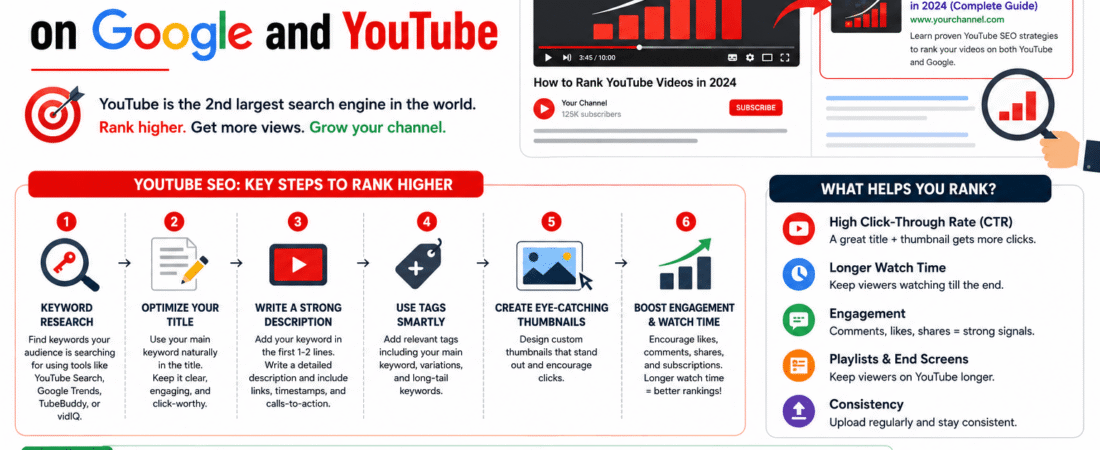
Most content creators spend hours scripting, shooting, and editing a single video, only to watch it sit quietly on YouTube with fewer than fifty views. It is a frustrating cycle. You know your content brings genuine value, but the algorithm seems to ignore your hard work entirely. The missing piece of the puzzle isn’t better lighting or a more expensive microphone. It is YouTube SEO.
When optimized correctly, videos do not just perform well inside YouTube’s internal search engine. They also capture prime real estate directly on Google search engine result pages (SERPs). Because Google owns YouTube, video carousels and standalone video snippets appear for millions of informational, transactional, and navigational search queries every single day. If you want to tap into this massive wave of organic traffic, understanding how to rank your videos on both platforms is non-negotiable.
Why Google Loves YouTube Videos
Google’s primary goal is to give searchers the most satisfying answer to their query as fast as possible. Sometimes, a text-based blog post is the best format. Other times, a user wants a visual demonstration, a product review, or a step-by-step tutorial. Google recognizes this shift in user intent and frequently prioritizes video results at the very top of page one.
Think about the last time you searched for how to fix a leaky faucet, configure a software tool, or review a new smartphone. Chances are, a YouTube video sat right above or alongside the traditional organic text results. Google pulls these videos directly from YouTube based on relevance, user engagement signals, and distinct metadata markers. If your video is structured and optimized according to what Google and YouTube’s indexing crawlers look for, you can bypass months of competitive text-based SEO and claim top rankings almost immediately.
Step 1: Uncover High-Intent Keywords That Trigger Video Results
Before you turn on your camera or write a single word of a script, you need to know what people are actively searching for. Not every keyword on Google will trigger a video carousel. Your first step is to identify search terms that already show video results.
Conducting Dual-Platform Keyword Research
Start by opening an incognito browser window and typing your core topic ideas into Google. Look closely at the results page. Do video thumbnails appear? If Google is already displaying videos for that specific query, it means the algorithm considers video the preferred medium for that search intent. These are your prime targets.
Next, use YouTube’s internal search bar and autocomplete feature. Type in your seed keyword and see what drop-down suggestions appear. These suggestions represent actual queries typed by real users. Long-tail keywords—such as “how to set up email marketing automation for beginners”—often have lower competition and much higher conversion rates than broad head terms like “email marketing.”
Step 2: Optimize Your Video Metadata for Algorithms and Humans
YouTube and Google cannot actually watch your video to understand every single frame. Instead, they rely heavily on your text metadata. Every piece of textual information you provide acts as a signpost telling the search engine crawlers what your content is about.
Crafting a Search-Friendly Title
Your title must strike a careful balance between search optimization and click-through appeal. Include your exact primary keyword near the beginning of the title so the algorithm immediately grasps the core subject. However, do not write robotic titles stuffed with keywords. Human beings still need to feel compelled to click.
Example: Instead of “SEO Guide 2024 Ranking Tips,” use “YouTube SEO in 2024: How to Rank Your Videos on Google.”
Writing a Comprehensive Video Description
Treat your video description like a mini-blog post. The first three lines are the most critical because they appear above the “Show More” fold on both YouTube and mobile search results. Place your primary keyword within the first 100 words and summarize the core value of the video.
Following the intro, provide a detailed breakdown of what is discussed, including timestamps. Timestamps are crucial because Google frequently uses them to create “Key Moments” directly in its search results, allowing users to jump straight to the exact section of your video that answers their question.
Step 3: Engineering High Audience Retention
Keywords and metadata can get your video discovered, but user behavior determines whether it stays at the top. YouTube and Google track how people interact with your content. The single most important metric in this regard is audience retention.
If a user clicks on your video from Google search and closes it within ten seconds, it sends a strong negative signal to the algorithm. Conversely, if viewers watch 60% to 70% of your video, the algorithm will actively promote it across suggested video sidebars and homepage feeds.
Practical Ways to Hook Viewers Instantly
- Cut the fluff: Skip the long cinematic intro, channel logos, and rambling greetings. State the exact problem you are going to solve within the first five seconds.
- Pattern interrupts: Change camera angles, insert relevant B-roll, use graphics, or add sound effects every 8 to 15 seconds to keep the viewer’s brain engaged.
- Pacing and structure: Deliver on the promise you made in the title and thumbnail. If viewers feel tricked by clickbait, they will drop off immediately.
Step 4: Leveraging Engagement Signals and Channel Authority
Search engines value consensus. When a community actively engages with a piece of content, it signals high quality. YouTube looks closely at specific user actions that go beyond simple views.
Encourage genuine interaction by asking thoughtful questions in your video and prompting viewers to leave their thoughts in the comments. Pin a top comment and reply to early responses to spark a conversation. Additionally, track metrics like click-through rate (CTR). Your thumbnail and title work together as a billboard; if your CTR is below 4%, redesign your thumbnails to make them clearer, bolder, and more emotionally compelling without resorting to cheap clickbait.
Ready to Dominate Search Results Across Google and YouTube?
Mastering video algorithms takes time, continuous testing, and deep technical expertise. If you want to accelerate your growth, drive qualified organic traffic, and turn viewers into loyal paying customers, our team can help you build a winning strategy.
Frequently Asked Questions
How long does it take for a YouTube video to rank on Google?
Unlike traditional websites that can take months to build domain authority, YouTube videos can sometimes rank on Google within hours or days of publishing. Because Google already trusts YouTube’s domain authority, optimized videos with strong initial engagement can bypass standard search sandbox delays and hit page one quickly.
Do I need a large subscriber count to rank on Google and YouTube?
No, subscriber count is a secondary metric for the search algorithm. Both YouTube and Google prioritize relevance, audience retention, click-through rate, and search intent alignment over channel size. Many new channels with fewer than 1,000 subscribers regularly outrank established industry giants simply by targeting long-tail keywords and delivering superior viewer satisfaction.
Are transcripts and closed captions necessary for video SEO?
Yes, absolutely. Search engine crawlers index text. By providing an accurate transcript or clean closed caption file, you give the algorithms additional context regarding the spoken words inside your video. This significantly enhances your semantic SEO footprint and ensures better ranking accuracy for niche phrases.
What is the most critical factor for ranking videos?
Audience retention combined with click-through rate serves as the ultimate indicator of success. If people click your video from Google or YouTube and stay to watch a substantial portion of it, the algorithm recognizes that your content satisfies the user and will continue pushing it to wider audiences.