
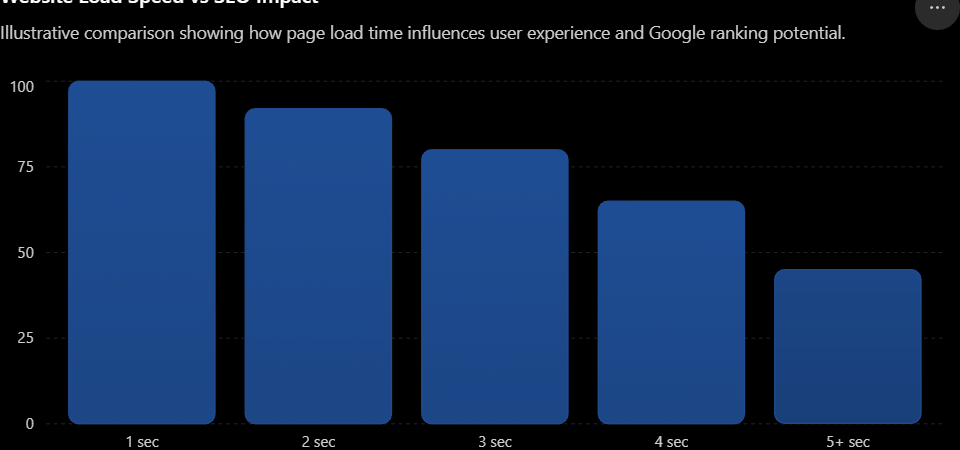
Website speed is one of many factors Google uses to rank pages, and here’s how it actually works:
The direct mechanism: Core Web Vitals
Google uses a set of specific speed metrics called Core Web Vitals as a ranking signal:
- Largest Contentful Paint (LCP) — how long it takes for the main content to load (good: under 2.5 seconds)
- Interaction to Next Paint (INP) — how responsive the page feels when someone clicks or taps (good: under 200ms)
- Cumulative Layout Shift (CLS) — how much elements jump around while loading (good: under 0.1)
Pages that pass these thresholds get a small ranking boost. But Google has been clear that this is a “tiebreaker” signal — it matters more when comparing pages of similar quality and relevance. It won’t rescue a page with thin or irrelevant content, and it won’t sink a genuinely excellent page that’s a bit slow.
The indirect effects (often bigger than the direct ranking boost)
Speed influences rankings in less obvious ways too:
- Bounce rate and dwell time — slow pages lose visitors before content even loads. If people bounce back to search results quickly, that’s a negative behavioral signal.
- Crawl budget — for large sites, faster servers let Googlebot crawl and index more pages in the same amount of time.
- Mobile experience — Google primarily uses mobile-first indexing, and mobile connections are more speed-sensitive, so slow mobile load times hurt disproportionately.
- Conversions and engagement — not a ranking factor directly, but a slow site that converts poorly can affect the business case for SEO investment, even if rankings look fine on paper.
Practical takeaway
If your site loads in a reasonable time (roughly under 2-3 seconds) and passes Core Web Vitals, further speed optimization will have diminishing returns for rankings specifically. Content quality, relevance, backlinks, and search intent match are much bigger levers. But if your site is slow — say, 5+ seconds to load — fixing that can meaningfully help both rankings and user experience.
How Google measures it
There are two data sources, and they measure different things:
- Field data (CrUX – Chrome User Experience Report): Real measurements from actual Chrome users visiting your site. This is what Google actually uses for ranking.
- Lab data (Lighthouse, PageSpeed Insights): Simulated tests run in a controlled environment. Useful for debugging, but not what determines your ranking.
This distinction matters a lot — you can get a perfect Lighthouse score in the lab and still have poor field data if your real users are on slow connections, older phones, or geographically far from your server.
Where to check your actual numbers
- PageSpeed Insights (pagespeed.web.dev) — shows both field and lab data for any URL
- Google Search Console → Core Web Vitals report — shows field data aggregated across your whole site, grouped by URL pattern, so you can spot systemic issues
- Chrome DevTools → Performance panel — for deep debugging
Common causes of slow LCP
- Unoptimized images (biggest culprit, by far)
- Slow server response time (TTFB)
- Render-blocking CSS/JavaScript
- Client-side rendering that delays content painting (common in JS-heavy frameworks)
Common causes of poor INP
- Heavy JavaScript execution blocking the main thread
- Large third-party scripts (ad tech, analytics, chat widgets)
- Too much work happening on every click/input event
Common causes of layout shift (CLS)
- Images/ads without reserved dimensions (width/height attributes)
- Web fonts loading late and causing text reflow
- Content injected above existing content (banners, cookie notices)
Quick wins, roughly in order of impact
- Compress and modern-format images (WebP/AVIF), add explicit width/height
- Use a CDN to cut server response time for geographically distant users
- Defer or remove non-critical third-party scripts
- Preload key resources (hero image, main font)
- Enable browser caching and compression (gzip/brotli)
One nuance worth knowing: optimizing for Lighthouse scores specifically can lead you astray, since it’s a lab simulation with fixed conditions. Always cross-check against the Search Console field data before declaring victory — that’s the version of “speed” Google is actually ranking on.